Intent Execution: One-Click Trading for Faster Trading on Sai
Sign in once, then trade without a wallet popup or gas on every order. Here is why we built one-click trading and how it works.
We talk to Sai traders a lot. By far, the feedback that comes up most often is speed. People want to see their balances update and know what happened to a trade without waiting around.
Some actions took more than ten seconds before the result appeared in the app. That’s a long time when you’re managing a position. You clicked because you wanted something to happen, and then you waited to find out whether it did.
That feedback shaped what we prioritized. We worked on caching to improve initial and repeat load times. Then we changed how trading actions move through Sai. One-click trading is now live: you sign in once with your wallet, and after that you open, close, and manage positions without a wallet popup or gas for each trade.
This post explains why we built it this way, what happens after you click, and what we’re still working on.
A fast chain has to feel fast in the app
Nibiru executes transactions quickly. A trader can still sit and wait to see the updated position. Both things can be true at the same time.
A trader experiences the whole trip. Before this change, they clicked, approved the trade in their wallet, waited for the wallet to submit it, waited for execution, and then waited for the app to show what changed. Every one of those steps was a place to wait, and the wallet popup was in the middle of every trade.
Looking only at block times leaves out most of what a trader experiences as slowness. So we asked a more useful question: what happens between the trader’s request and the moment they see its result?
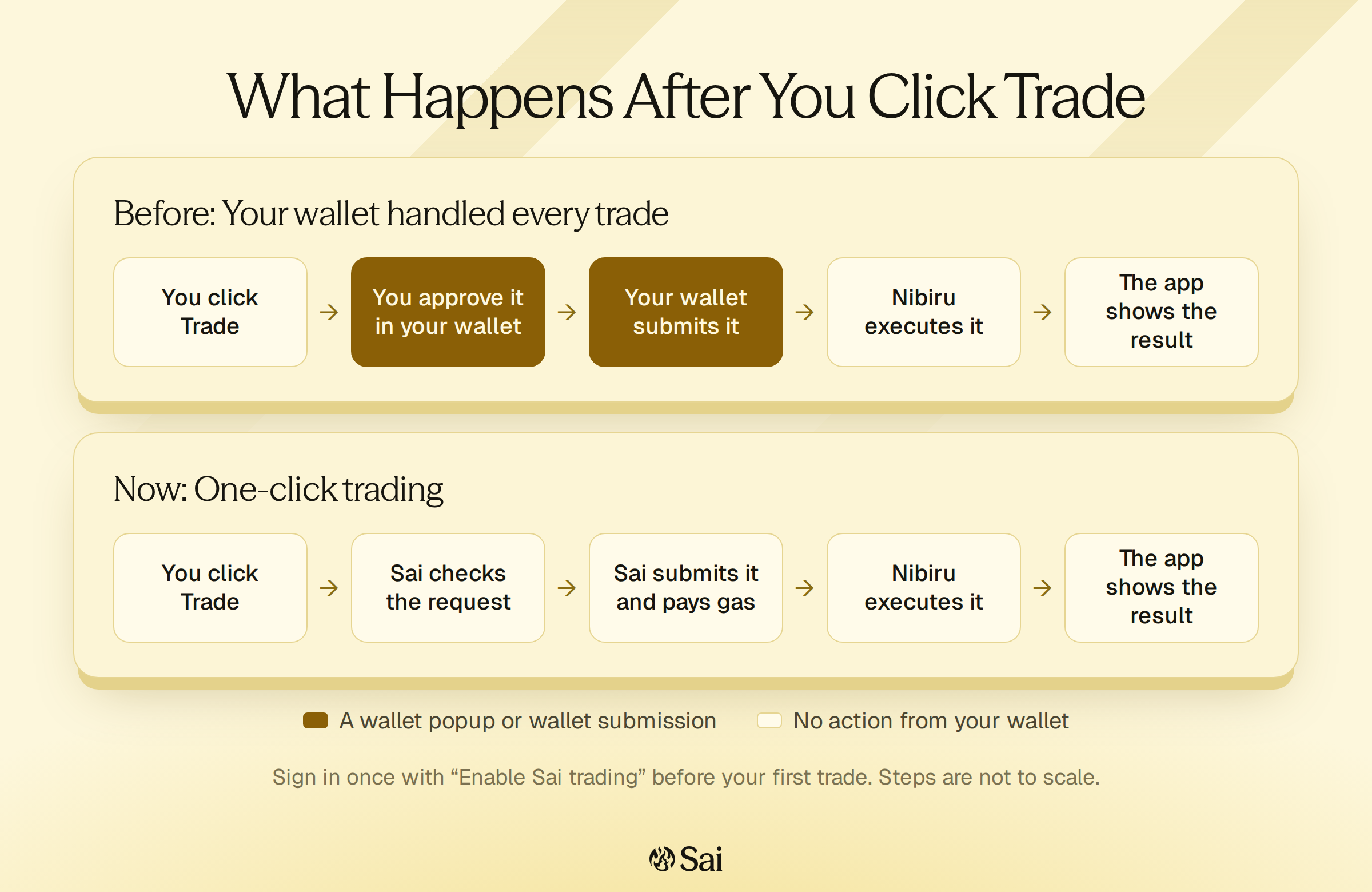
What happens after you click Trade now
The first time you trade, your wallet asks you to sign a message titled Enable Sai trading. It proves you control the wallet. It isn’t a transaction, it costs no gas, and it doesn’t approve any token spending. The message uses EIP-712, Ethereum’s standard for signing structured data, so your wallet shows you exactly what you’re signing. You can also sign in ahead of time with Connect trading in the wallet menu.
After that, each trade goes like this:
- You click a trade button. The app sends your request to the Sai Trading Engine, the services behind the app that run trading on Sai.
- The engine checks that you’re signed in and that the request is valid, then tests the trade against the contract.
- A dedicated Sai account submits the trade to the Perp contract and pays the gas. The contract executes it on your account, using your Sai balance.
- Your position updates once the trade appears in your trade history.
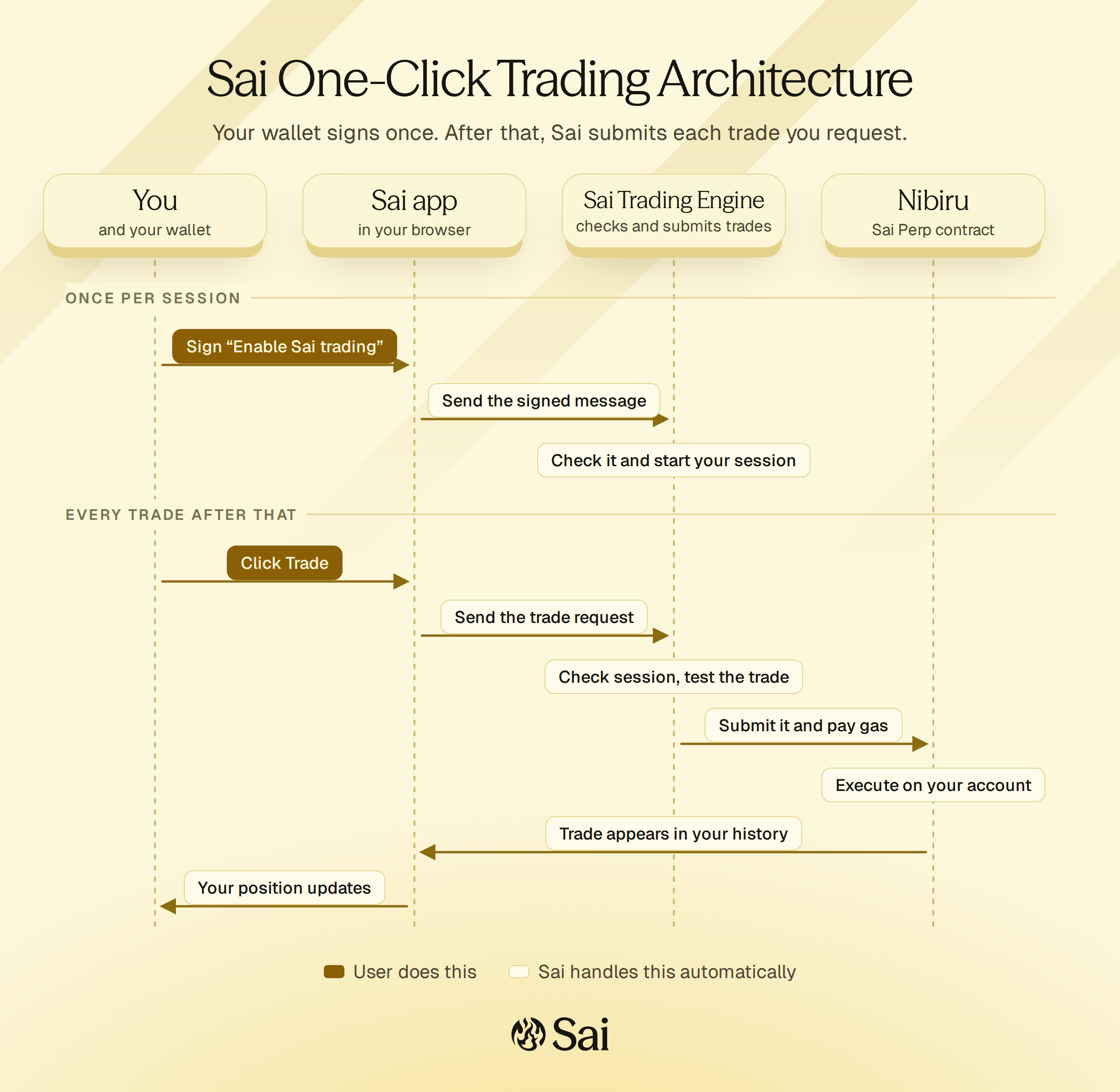
That should feel familiar if you’ve used a centralized exchange. You submit the order in the app, and the exchange handles the rest. Your funds stay in the Sai contracts the whole time.
One-click covers everyday trading: market, limit, and stop orders, full and partial closes, cancelling pending orders, take profit and stop loss, leverage changes, and adding or removing margin. Deposits, withdrawals, and bridging still ask your wallet to approve a normal transaction, because those move funds in or out of Sai.
Why sign-in is a signed message
Signing in to Sai works like proving who you are at the door. Your wallet signs a message that only the holder of that wallet’s key could produce. Sai checks the signature, and that proof of signing authority is what starts your session. Nothing moves on chain when you sign it.
We chose a signed message because almost every EVM wallet already supports it, including wallets that can’t submit transactions on Nibiru. EIP-712 also makes the message readable in the wallet, so you can see the action, your address, and when the request expires before you sign. That beats signing an opaque string.
It also points at where we want trading to go. Sign once, then trade without bouncing between the app and your wallet on every order. On a phone, that back-and-forth is the most tedious part of trading onchain, and removing it is a big part of making Sai easy to use from a mobile device.
What the session allows, and what it doesn’t
Handing trade submission to a Sai account is a real change in who does what, so it’s worth being specific about the boundaries.
Signing in lets the Sai Trading Engine submit the trade actions above on your account, and only after you request them in the app. The Perp contract still checks every trade the same way it always has, including your collateral and leverage limits.
The account that submits one-click trades can’t withdraw your funds, transfer your balance to another address, or change the contract’s settings. When you close or reduce a position, the proceeds go back to your Sai balance. Moving funds out of Sai always takes a transaction you approve in your wallet.
The tradeoff is that your wallet no longer signs each trade. The contract relies on the engine to send only the trades you asked for, and the engine checks your session on every request. Sessions expire, and each one belongs to one wallet on one network. The one-click trading guide covers session length and how to keep a session safe.
Following what the trader asked us to do
We organized this work around intents. An intent is a record of the action someone asked Sai to perform, such as opening or closing a position.
Each request gets an identity that connects it to its execution and to the result reported back to the app. That matters because a transaction hash alone doesn’t tell the whole story of what the trader experienced. Some requests never become a transaction at all, for example when a trade fails the contract check before Sai sends it.
The identity lets us keep separate things separate: Sai accepting the request, the trade executing on chain, and the trader seeing the update. The app shows those stages too.
| What you see | What it means |
|---|---|
| Order submitted | Sai accepted your request. It’s awaiting onchain execution. |
| Checking status… | The app hasn’t seen the final result yet. |
| Trade confirmed on-chain | The trade executed. Your position updates once it appears in your trade history. |
| Trade request failed | Sai didn’t send the trade. Nothing executed, and your balance is unchanged. |
Accepting a request isn’t the same as completing the trade, and the app shouldn’t pretend otherwise. Keeping those stages apart is how a complaint like “my balance took too long to update” becomes a question we can trace through one particular action.
Execution moved into infrastructure we operate
We took transaction submission out of the individual browser and wallet and moved it into our execution infrastructure, backed by our own Nibiru nodes and RPC services. That gives us more control over submission, tracking, and recovery when a response gets interrupted.
The browser still needs a connection to submit a request and receive updates. Once Sai accepts the request, though, execution continues on the server even if the browser disconnects. If you close the tab while a trade is pending, Sai still processes it. When you come back, the app checks what happened to your pending requests and updates your positions.
That also means we’re responsible for following every accepted request through to its actual outcome. If Sai can’t send a request within two minutes of receiving it, the request expires and nothing executes.
Use the wallet you already have
There’s another consequence of moving trade submission out of the wallet. The connected wallet no longer has to submit each trade on Nibiru. Any EVM wallet that can sign the sign-in message can trade, including MetaMask, Rabby, Coinbase Wallet, WalletConnect wallets, and wallets created with email or social login in the Sai app.
Cosmos wallets such as Keplr and Leap can still deposit, withdraw, and bridge, but they can’t use one-click trading. Wallet setup has the details.
What we’re still working on
One-click trading removes the wallet popup from every trade. It doesn’t make every part of the trip instant, and we haven’t published before-and-after timings yet. We’d rather show measured numbers than estimates, so a later post will cover the time from click to visible result once we have enough samples to be honest about it.
Funding is the other half. Sai Teller is our work on depositing and withdrawing USDC through supported chains without a separate bridge app. Together with one-click trading, it opens a path for more people to fund and trade on Sai with the wallet they already have.
Caching helps people load the app. One-click trading changes the repeated trading flow. Teller addresses getting funds in and out. We’re working on those because they’re where traders told us the experience needed to improve.